¶ Ascendance Buyback — How to create a contract (Auth → In-game)
This page explains how to use the Ascendance Buyback Program to calculate your price and create the correct in-game contract.
¶ 1) Open the Buyback page
Go to: https://auth.ascee.net/buybackprogram/
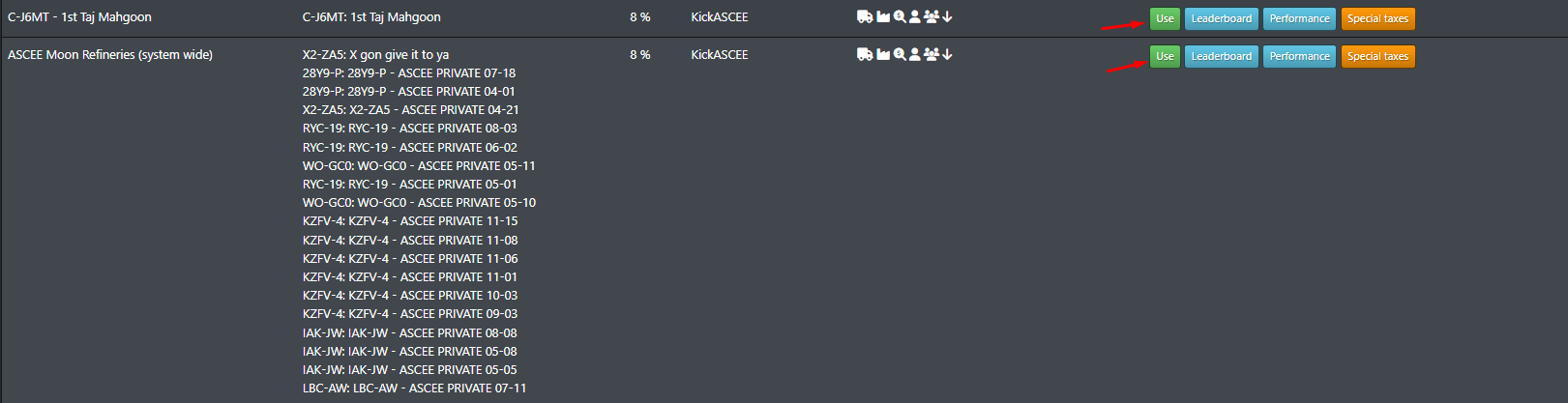
You will see a list of buyback programs (locations).
Pick the program that matches where your ore/items currently are.
¶ Buttons & icons (on the program list)
- Use → opens the calculator for that location.
- Leaderboard / Performance / Special taxes → these can be ignored.
- The small icons next to KickASCEE show additional info (mouse over them to see what they mean).
¶ 2) Select the correct program (location)
¶ Quick picks
- C-J6MT: 1st Taj Mahgoon
- ASCEE Moon Refineries (system wide) (see full list below)
Full list — ASCEE Moon Refinery Programs (click to expand)
| System | Program name |
|---|---|
| X2-ZA5 | X gon give it to ya |
| 28Y9-P | 28Y9-P - ASCEE PRIVATE 07-18 |
| 28Y9-P | 28Y9-P - ASCEE PRIVATE 04-01 |
| X2-ZA5 | X2-ZA5 - ASCEE PRIVATE 04-21 |
| RYC-19 | RYC-19 - ASCEE PRIVATE 08-03 |
| RYC-19 | RYC-19 - ASCEE PRIVATE 06-02 |
| WO-GC0 | WO-GC0 - ASCEE PRIVATE 05-11 |
| RYC-19 | RYC-19 - ASCEE PRIVATE 05-01 |
| WO-GC0 | WO-GC0 - ASCEE PRIVATE 05-10 |
| KZFV-4 | KZFV-4 - ASCEE PRIVATE 11-15 |
| KZFV-4 | KZFV-4 - ASCEE PRIVATE 11-08 |
| KZFV-4 | KZFV-4 - ASCEE PRIVATE 11-06 |
| KZFV-4 | KZFV-4 - ASCEE PRIVATE 11-01 |
| KZFV-4 | KZFV-4 - ASCEE PRIVATE 10-03 |
| KZFV-4 | KZFV-4 - ASCEE PRIVATE 09-03 |
| IAK-JW | IAK-JW - ASCEE PRIVATE 08-08 |
| IAK-JW | IAK-JW - ASCEE PRIVATE 05-08 |
| IAK-JW | IAK-JW - ASCEE PRIVATE 05-05 |
| LBC-AW | LBC-AW - ASCEE PRIVATE 07-11 |
¶ 3) Paste your items into the calculator
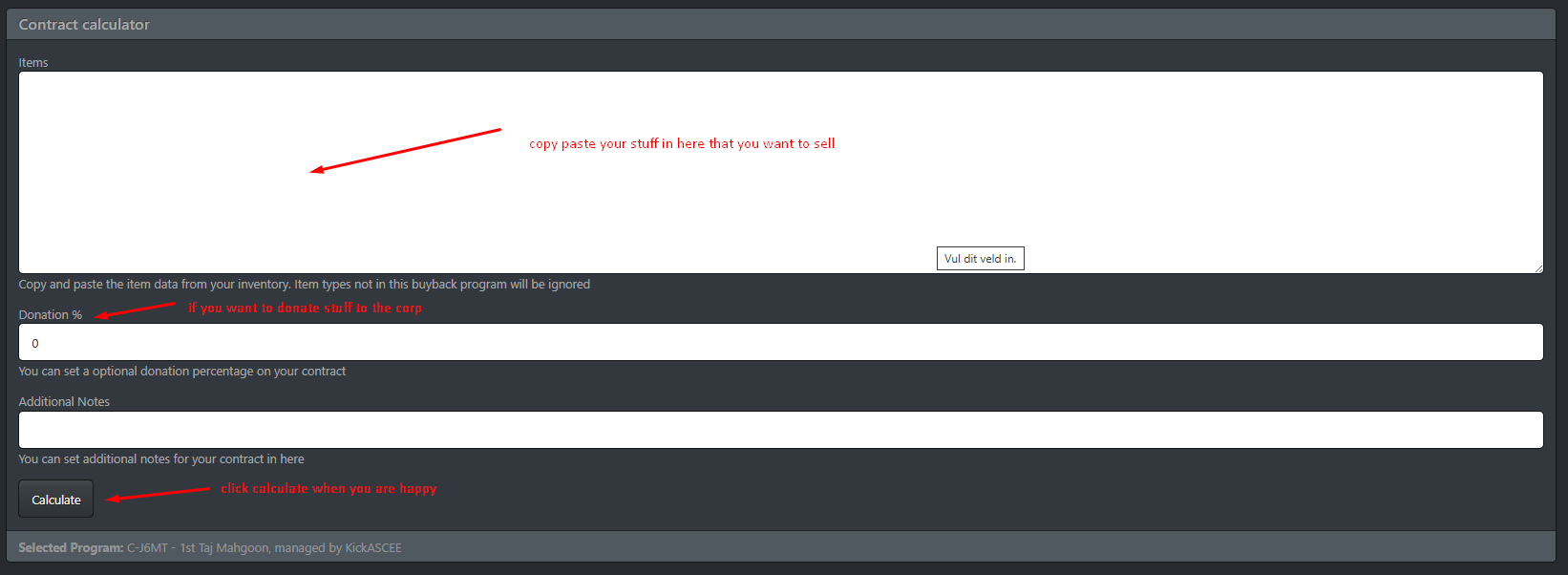
After clicking Use, you’ll land on the Contract calculator.
¶ What to fill in
-
Items
Copy/paste the items you want to sell into the big box.- Items not supported by this buyback program will be ignored automatically.
-
Donation % (optional)
If you want to donate part of the value to Ascendance, set a percentage here. -
Additional Notes (optional)
Leave a message for the admin (example: “please accept even if extra random loot is included” / “this is from op X” / etc.). -
Click Calculate
¶ 4) Create the in-game contract EXACTLY like shown
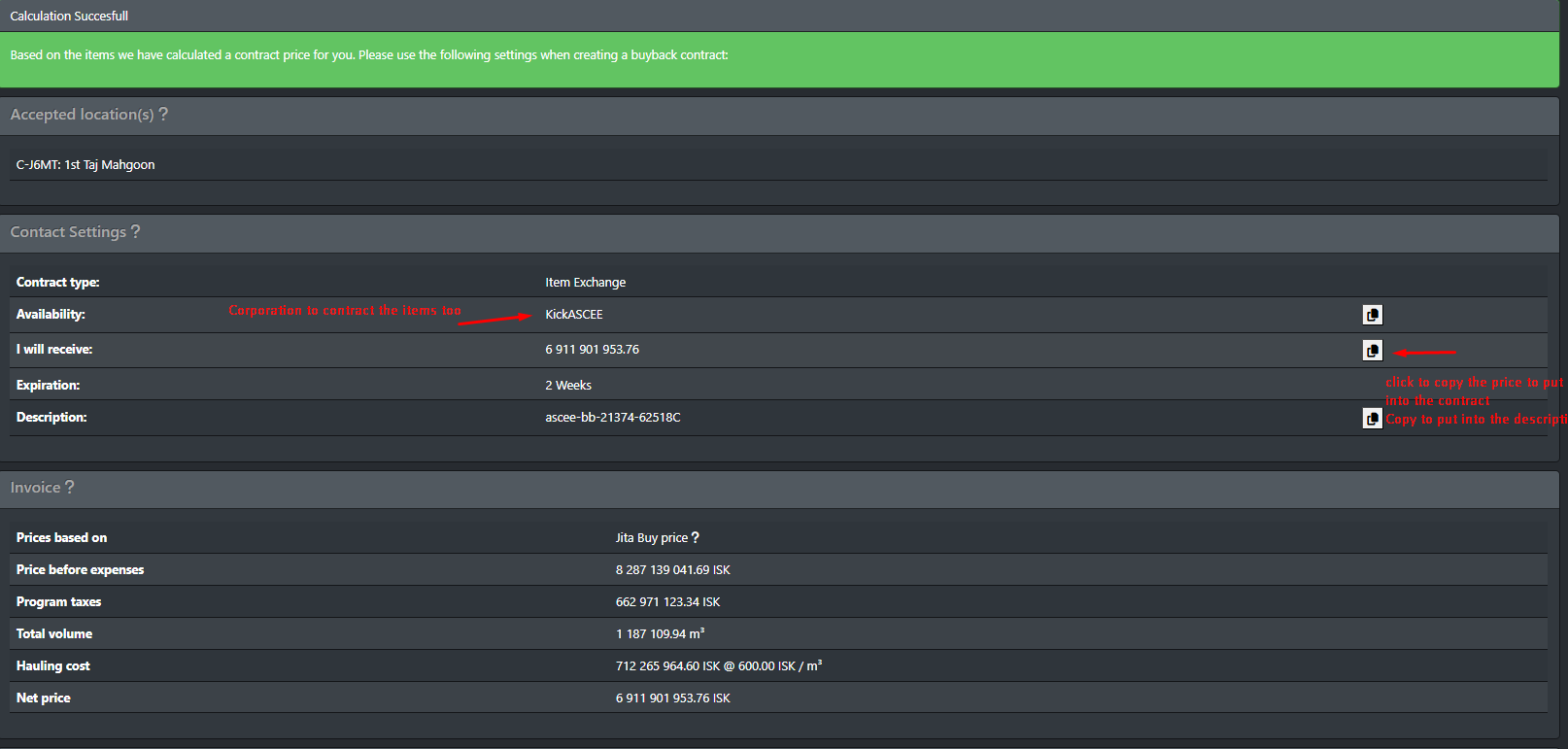
After Calculate, you will see a “Calculation Successful” page with the exact contract settings to use.
¶ Contract rules (very important)
- Contract type:
Item Exchange - Availability: Corporation, to KickASCEE
- Click the copy icon on the right to copy
KickASCEEto your clipboard, then paste it in-game.
- Click the copy icon on the right to copy
- I will receive: paste the exact ISK value shown
- Use the copy icon to copy the amount.
- Expiration: set to
**2 weeks** - Description: copy/paste the
**exact description string**shown- Use the copy icon next to Description.
Do NOT contract to Ascendance directly — the buyback contracts go to KickASCEE (as shown by the calculator).
¶ Quick in-game checklist
- You are contracting the items located in the
**accepted location**shown on the page. - Contract is
**Item Exchange**. - Availability is Corporation →
KickASCEE. - Price, description, and expiration match the calculator.
¶ 5) Understanding the “Invoice” section
The Invoice section shows how the final price is calculated, including things like:
- Price source (example: Jita buy price)
- Program taxes
- Total volume
- Hauling cost
- Net price (what you will receive)
This is informational, but useful if you want to understand why the net payout is lower than “price before expenses”.
¶ 6) Item verification (why contracts can get rejected)
The program checks whether the items inside your in-game contract match what you pasted into the calculator.
¶ What happens if items don’t match?
- Missing items (contract has less than calculated):
The program will flag it to the admin and the contract will usually be rejected. - Extra items (contract has more than calculated):
Up to the admins:- they may message you, or
- accept it and treat extras as a donation.
Best practice: paste your list, calculate, then contract those same items (don’t add/remove stuff after calculating).